Overview
I built Python trading bots to trade options through Interactive Brokers (IBKR). The system trades 0DTE put/call credit spread options on the SPX index. I used ideas from Professional Automated Trading: Theory and Practice by Eugene A. Durenard when designing the system.
The bot selects the options, submits a spread order and adjusts its limit price while waiting for a fill. I’ve described how I’ve designed the software and the problems involved in making it behave correctly when market data and broker responses arrive asynchronously.
The problem
I needed a program that could receive live asynchronous tick level market data, process it and manage SPX 0DTE put/call credit spread combo-orders through IBKR. The application had to simultaneously keep track of both its own calculations and keep up to date stores of current working contracts.
A back-testing system can assign a fill to a simulated order. However, in a live application, submitting an order only starts the process. The broker may accept it, reject it, partially fill it or report a status change as the order is working. Market prices can also change while the bot is waiting for a response.
Outstanding order results are uncertain, because status can change while order updates are working. If the bot requested a cancellation and immediately submitted a replacement, the original might still fill. The program needed to resolve what had happened before assuming it was free to place another order.
Logging trade decisions and actions, and cumulative calculations, so that decisions and actions can be traced through the entire system. This becomes complicated when dealing with asynchronous requests being passed across a multithreaded producer-consumer system.
What was achieved?
I built a modular, multi-threaded Python application using the IBKR API through the IB Gateway program. It handles market-data subscriptions, validates incoming events, resolves option contracts and manages spread orders through to a fill or confirmed cancellation. It will manage requests for live options data by querying for valid contracts and actively subscribing to contracts near the price of the index.
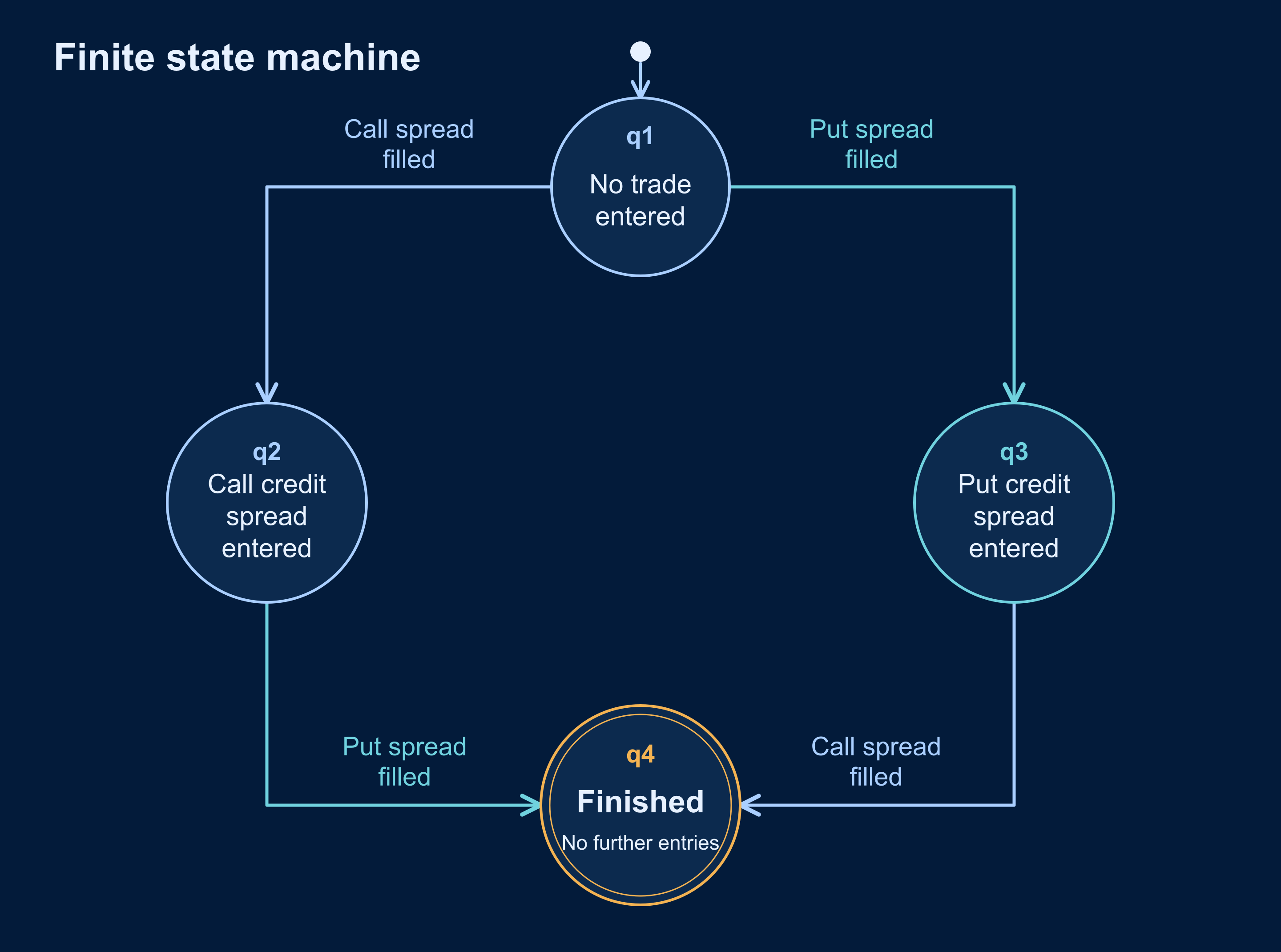
I used a finite state machine to control the application’s progression and a separate worker to handle orders. This allows the program to continue processing market data while it waits for the broker.
I built text-file logging to trace decisions and calculations through the software. The logs record the settings the software was run on, the actions it attempted and the responses received from IBKR. It logs iterative stages of the computations, so we can identify if an error was caused by the calculation or the supplied data. The logs include important figures throughout the decision process that can be checked with external tools to show the process up to that point is valid for that run. Each log line is marked with a date, time the log was produced (accurate to milliseconds), time the log was written to the file (to the milliseconds), and the thread id so that it is possible to uniquely identify the part of the agent that posted the log.
Technical implementation
The application is organised around events passed between threads using Python queues. IBKR sends data through callbacks, which I convert into event objects with a consistent structure. An event router then passes each event to the relevant processing or logging component.
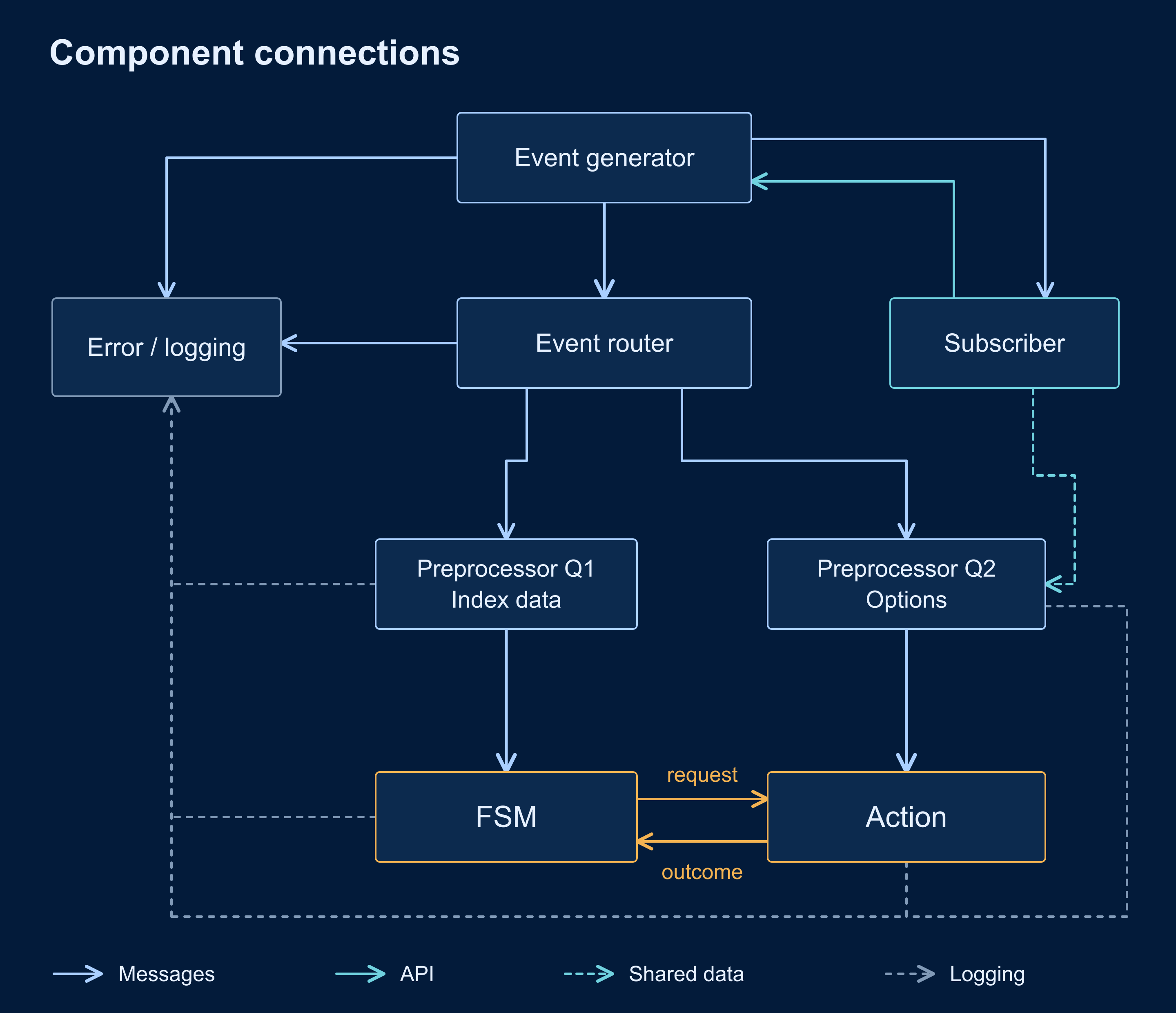
Index data and option data are processed separately. The subscription manager keeps track of the contracts for which data has been requested, and request identifiers connect incoming responses to the correct options. This matters because a response can arrive after the subscription it belonged to has changed. The program checks the request against its current records before using that data.
The order worker has a dedicated queue for contract details, order updates, executions and associated API errors. It checks this ahead of streaming quote traffic. Without this separation, a backlog of price updates could delay the very acknowledgement the worker was waiting for, even though the broker had already sent it.
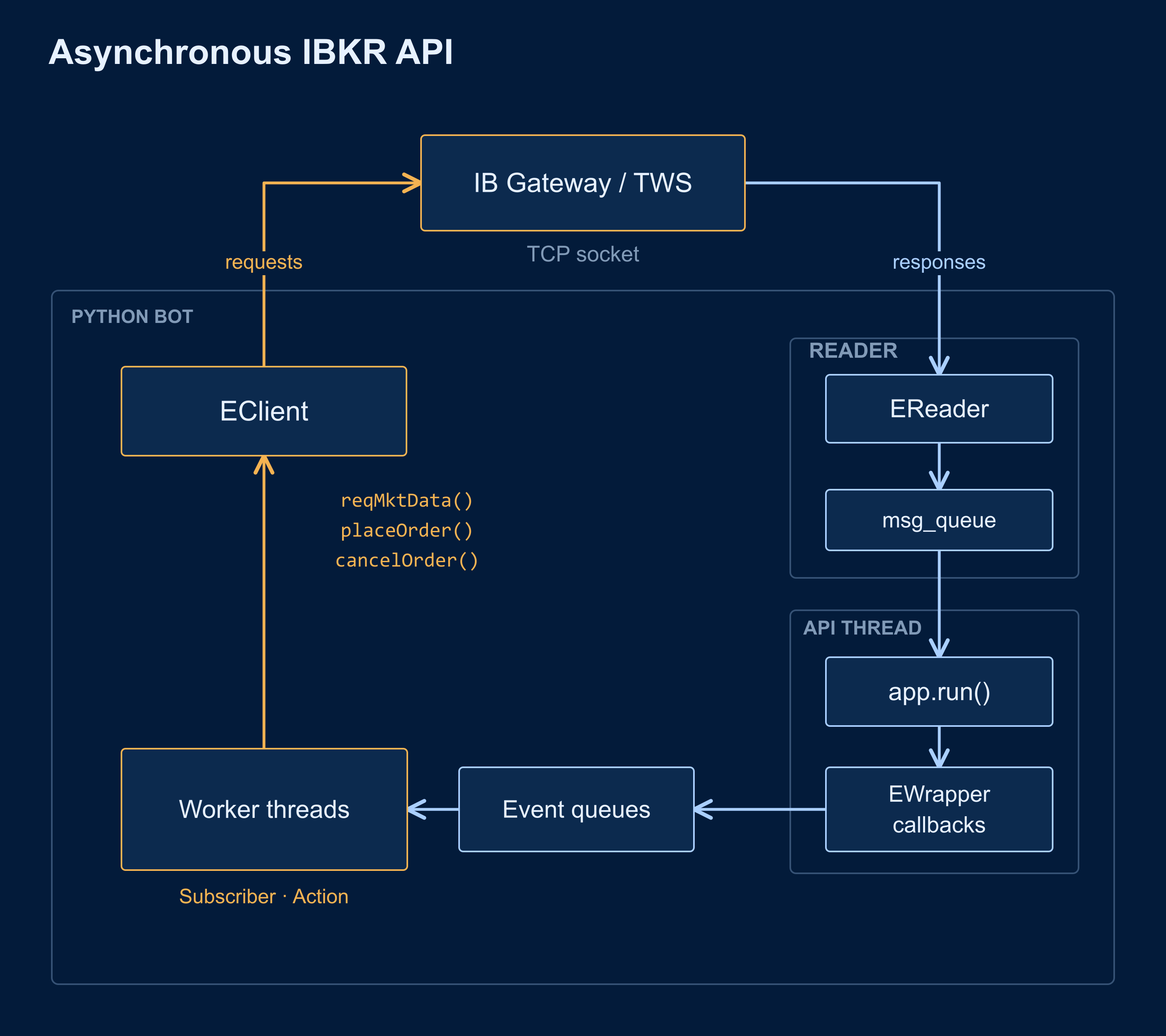
I kept the logging process on its own queue as well. Components send diagnostic events to the logger, which writes them to the appropriate files. This keeps the file-writing code in one place and lets messages from several threads be recorded consistently.
Keeping track of orders
I used the finite state machine to distinguish a requested trade from a completed trade. Sending an instruction to the order worker doesn’t mean a position has been opened. The state machine waits for the worker to report the outcome before updating its state.
The worker tracks the active order identifier, the submitted limit price, broker acknowledgement, filled quantity and remaining quantity. It processes order-status and execution callbacks while an order is working, including callbacks that arrive in a different order from the one the program might expect.
For example, an order-status message can arrive before the corresponding order details. The program has to match these responses to the same order and establish whether the broker has acknowledged the submitted price. Treating the first message as a complete account of the order would miss part of the information.
Partial fills also need their own handling. An unsuccessful attempt can still have created exposure, so the bot records any filled quantity and prevents further entries when the result is partial. It doesn’t treat that outcome as though nothing happened.
Testing and reviewing execution
I reviewed the bot by comparing its behaviour with existing trading bots on WhisperTrades. I also compared it with the back-testing software in WhisperTrades and QuantConnect to check that my implementation was consistent with the back-tests.
For the calculations, I compared the EMAs produced by my bot with those from QuantConnect and TradingView. My logs record the intermediate steps, so I could follow a value back through the calculations and check the data used to produce it.
During the review process, I was able to request some internal logs from IBKR. I compared these with my own bot’s logs so I could see what was happening on both sides of the connection. This let me follow the messages and order updates through the system in more detail, and verify that the bot’s flow was correct.