Overview
I’ve described how I got the model to know up-to-date company policy and product information. This describes the design of the database, why I chose a vector database, how I created it, and how I integrated it into the fine-tuned LLM’s responses.
The problem
After training, the model wouldn’t know the correct company policy if it was ever updated.
The company has 698 distinct products, and I trained the model on approximately 700 training examples. This isn’t sufficient to learn what the company has to offer. Many products never show up in the training data. Despite this, it needs to be able to provide product suggestions to a customer and ask relevant questions.
Customers will describe a style or a preference without knowing a product name or the terminology used on the website's page. For example, “I’d like a simple ring that isn’t too flashy and is comfortable to wear daily” might need to match relevant product descriptions even when those words don’t match any product description exactly.
The model can’t search the internet, and so doesn’t know the website links to direct the customer to products they might like.
What was achieved?
I built a local vector database (1000+ entries) so that relevant product and policy information could be matched semantically without exactly matching words or phrasing. It retrieves the three most relevant records based on the conversation so far at each turn and provides the data to the model before it responds.
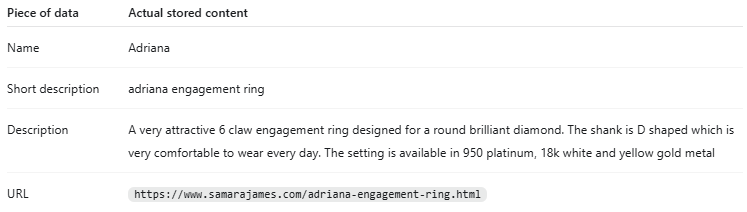
The database provides the model with the exact URL links for product pages that may be helpful in the conversation. For each it stores the product description on the website, its name, and other keywords associated with the product. If the customer provides the URL, the bot will be provided with the stored product data. If the customer provides a description, the bot will have the names, URLs and keywords of relevant products.
Within this database, there is one entry for each product, one entry for each key idea in the employee training documents, and one entry for each company policy.
Example of product data:
Example of policy information:
"Samara James offers a 60-day returns policy, giving you 60 days to get the opinion of your friends and family to ensure you’ve made the right choice."
"If you’re not completely satisfied with your jewellery, Samara James will pay the costs of return shipping. This is only for a refund or exchange. It is not the case for repairs or resizes."
Technical implementation
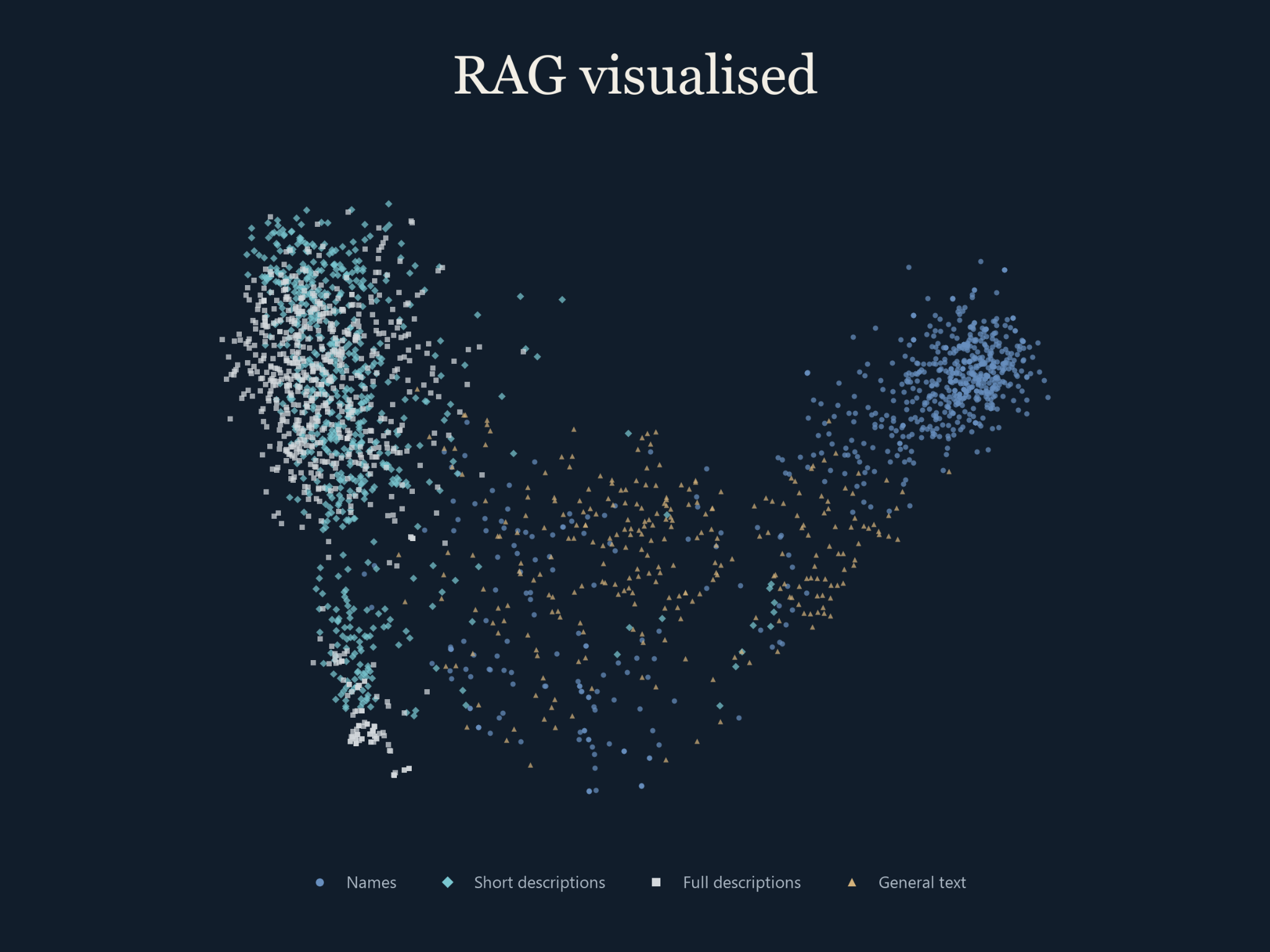
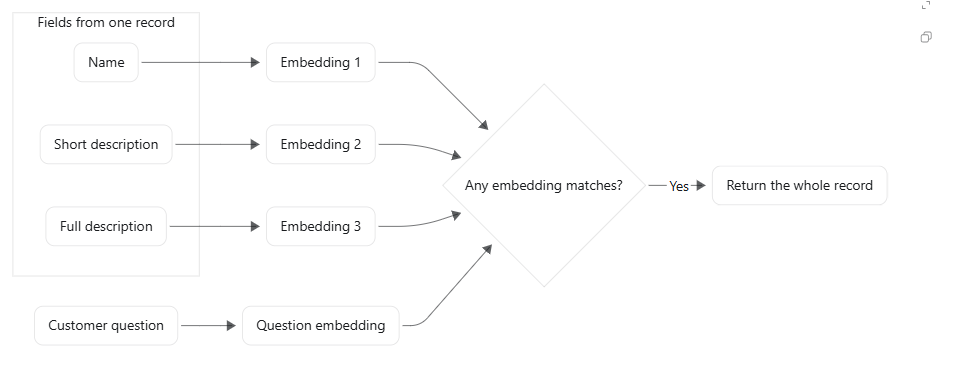
I implemented the knowledge base in Python as a JSONL dataset, combining product information with company policies and staff training documents. I used OpenAI’s text-embedding-ada-002 model to represent text as 1,536-dimensional vectors. Product records had separate searchable embeddings for their name, short description and full description, while general information used a single text embedding. Each vector remained associated with its original record, allowing a match against one field to return the complete product details and URL. The saved dataset contained 1,006 records represented by 2,402 searchable embeddings.
The below graph shows the position vectors, each with 1536 dimensions, projected onto a two-dimensional plane that preserves 20.6% of the variance.
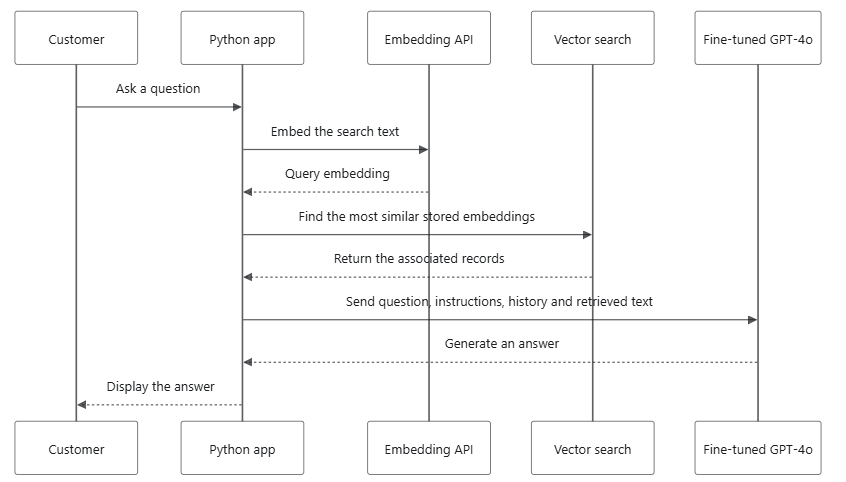
At runtime, the application loaded the stored vectors into NumPy arrays and converted the customer’s latest message into a query embedding. When available, the previous assistant response was included in the search text to give follow-up questions additional context. I normalised the query and stored vectors, then calculated cosine similarity using vectorised dot products to rank the candidates locally. The search initially selected the three highest-scoring vectors, with additional filtering and logic to widen the candidate search when too few results remained. This allowed retrieval to use similarity between text representations without requiring the customer’s wording to exactly match the stored descriptions.
The diagram below shows how records are checked in the database to determine whether they are sufficiently relevant to be returned. Specifically, it shows how the customer question is converted into an embedding and then compared to three stored embeddings for a single product page. This diagram leaves out how it handles the URL for simplicity as it is handled differently than the embedding search. For the URL, if a match is found in the customer's query, then the data is returned alongside the results of the ordinary vector search, which returns similar products.
I integrated retrieval with the fine-tuned GPT-4o model by adding the retrieved text to the messages sent through the chat completions API, alongside the customer’s question, system instructions and conversation history. The generated response was then added to the history for subsequent turns. Fine-tuning was used to adapt the model’s conversational behaviour to examples of staff interactions, while retrieval supplied product and policy information when answering each question. This separation meant that changes to company knowledge could be made available by updating the stored records, regenerating the affected embeddings and reloading the index, without retraining the conversational model.
The diagram below shows how the vector DB was used in the final Python app that I created. To respond to a customer query, the app needs to query two APIs: one to convert the query into a vector using a text embedding model (ada002), and another to obtain a response from the fine-tuned model. The vector search is performed locally.
Drawbacks to this architecture
The model had a tendency to make up product URLs. This was unexpected given that it had exact URLs to select from within the context window. This hallucination appeared often; about 5-10% of URLs it showed during testing led nowhere and didn’t match any URLs it had been presented with in its context window. In anticipation of this problem, I programmatically removed anything resembling a website link from the training data so it could not have been getting confused by misremembered training examples. This unfortunately made product recommendations unreliable: customers needed a working link to follow through on the advice, and retrieving the right product information didn’t always mean the model would write the correct URL.
If I were to do this project again, I would train the model to use the RAG suggestions accurately in the fine-tuning process. If this failed, I would programmatically insert the URL(s) after training the AI to insert placeholders wherever it wanted a URL to go. The last change would be to use a model that was substantially more advanced and less prone to hallucinations. At the time, GPT-4o was the best on the market, but other models now provide a substantially better hallucination rate.
The reason I didn’t want to use a low temperature setting to make this hallucination less likely is because we saw the best results from the model at a temperature of about 0.4 - and this was the temperature at which the model was evaluated. There are other more reliable solutions that would be less likely to impact the quality of the answer it was giving around the URL.